Your website’s title tags are the first thing searchers see in Google results, but getting the title length vs search engine display balance right can make or break your click-through rates and rankings. This guide is for content creators, SEO professionals, and website owners who want to master meta title optimization without getting lost in outdated advice.
Many sites struggle with titles that get cut off in search results or fail to grab attention because they don’t understand how Google actually displays titles. We’ll break down the search engine display mechanics that directly affect your visibility and show you how title length impacts your search rankings through real performance data.
You’ll learn the current title tag character limits that actually work in 2024, discover advanced optimization strategies that go beyond basic length rules, and get practical methods for measuring your title performance to see what drives results for your specific audience.
Understanding Title Length Fundamentals for SEO Success

Optimal character count ranges for maximum visibility
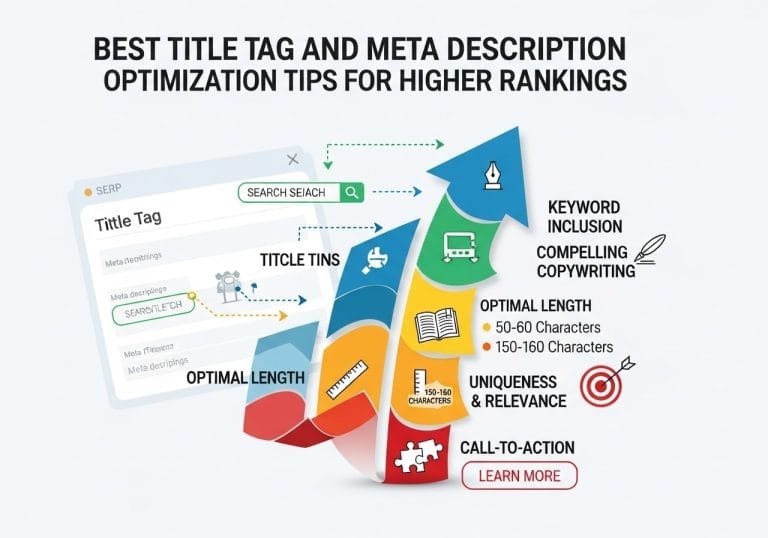
Google typically displays 50-60 characters of your title tag in search results, though this can vary based on the actual pixel width of characters used. The sweet spot for optimal title length for SEO falls between 50-60 characters, ensuring your entire title appears without truncation. Titles shorter than 30 characters might miss valuable keyword opportunities, while those exceeding 60 characters risk getting cut off with an ellipsis (…).
The character count isn’t the only factor – Google measures title width in pixels, not just characters. Wide characters like “W” and “M” take up more space than narrow ones like “i” and “l”. A 60-character title with mostly wide characters might get truncated, while a 65-character title with narrow characters could display completely.
Meta title SEO optimization works best when you front-load your most important keywords within the first 50 characters. This ensures they remain visible even if truncation occurs, maintaining your title length and CTR performance.
How search engines truncate lengthy titles
Search engines don’t simply chop off titles at a specific character limit. Google title display rules involve complex algorithms that consider pixel width, user intent, and query relevance. When your title exceeds the display limit, Google might:
- Truncate from the end and add “…”
- Remove middle portions while keeping the beginning and end
- Replace your title entirely with content from your page’s H1 tag or other relevant text
- Show different versions for different queries
This dynamic truncation means you can’t always predict exactly how your title will appear. The search engine might prioritize showing the portion most relevant to the user’s specific search query, potentially displaying different segments of the same title for different searches.
Mobile vs desktop display differences
Mobile search results show significantly fewer characters than desktop versions. While desktop displays might show up to 60 characters, mobile screens typically truncate titles around 50-55 characters due to smaller screen real estate.
| Device Type | Character Limit | Pixel Width |
|---|---|---|
| Desktop | 50-60 characters | ~600 pixels |
| Mobile | 50-55 characters | ~520 pixels |
| Tablet | 55-58 characters | ~580 pixels |
Mobile-first indexing makes this distinction crucial for your SEO title length best practices. Your titles need to work effectively on mobile devices where most searches now occur. Consider how your most important keywords and compelling elements appear within that tighter mobile constraint.
User behavior patterns with different title lengths
Research shows clear patterns in how users interact with titles of varying lengths. Shorter titles (30-40 characters) often generate higher click-through rates when they directly match search intent, but they might lack the descriptive detail that builds user confidence.
Medium-length titles (45-55 characters) typically perform best overall. They provide enough space for primary keywords while including compelling modifiers that encourage clicks. These titles strike the right balance between keyword optimization and user appeal.
Longer titles (55+ characters) can work well for specific, long-tail queries where users seek detailed information. However, when truncated, they risk losing critical information that influences user decisions.
Users scan titles quickly, spending only 2-3 seconds evaluating each result. The first few words carry disproportionate weight in their decision-making process. Title tag character limit awareness helps you position your most persuasive elements where they’ll have maximum impact on user behavior and search performance.
Search Engine Display Mechanics That Affect Your Rankings
Google’s Title Rewriting Algorithm Explained
Google doesn’t always display your carefully crafted title tags exactly as you wrote them. The search engine’s sophisticated algorithm automatically rewrites titles when it believes it can better match user intent or improve clarity. This happens more frequently than most website owners realize – studies show Google modifies titles in roughly 60% of search results.
The rewriting process kicks in when Google detects several scenarios. Your title might be too long, exceeding the optimal title length for SEO display limits. It could be stuffed with keywords that don’t flow naturally, or perhaps it doesn’t accurately reflect the page content. Google also rewrites titles that are too vague, duplicate across multiple pages, or contain excessive branding.
Google pulls replacement text from various sources on your page. The most common sources include H1 headings, prominent text near the top of the page, anchor text from internal links pointing to the page, and sometimes even content from the page body that better summarizes the topic.
The algorithm considers user search queries when making these decisions. If someone searches for “red running shoes” and your title says “Athletic Footwear Collection,” Google might display “Red Running Shoes – Athletic Footwear Collection” instead, pulling relevant keywords from your page content.
SERP Snippet Generation Process
Search engine results pages display title snippets through a complex process that balances multiple factors. Title length vs search engine display rules determine how much of your title appears before getting truncated with ellipses.
Desktop searches typically show 50-60 characters of your title, while mobile displays are more restrictive at 45-50 characters. These limits aren’t set in stone – they’re based on pixel width rather than character count. Wider letters like “W” and “M” take up more space than narrow ones like “i” and “l.”
The snippet generation process considers the search query context. Google highlights matching keywords in bold within the displayed title, making them stand out to users. This dynamic highlighting means your title length and CTR relationship depends partly on how well your title aligns with specific search terms.
SERP features also impact how titles display. Featured snippets, knowledge panels, and image packs can push organic results down, changing how users interact with your titles. Local results, shopping ads, and other SERP elements create different contexts where your title competes for attention.
Title Tag vs Displayed Title Discrepancies
The disconnect between what you write and what users see creates significant challenges for SEO title length best practices. Your original title tag serves as a suggestion to Google, not a guarantee of what appears in search results.
Common discrepancies include truncation where Google cuts off titles that exceed title tag character limit recommendations. Bracketed additions often appear when Google appends your site name or category information. Complete rewrites happen when Google replaces your entire title with what it considers more relevant content.
Brand name handling varies wildly. Sometimes Google removes brand names to save space, other times it adds them for clarity. The search engine might move brand names from the beginning to the end of titles or vice versa.
These discrepancies affect your meta title SEO optimization strategy in important ways:
- Click-through rates can improve or decline based on Google’s changes
- Brand recognition might suffer if Google consistently removes your company name
- Keyword targeting becomes less predictable when Google modifies your carefully chosen terms
- A/B testing becomes more complex since you’re testing both your version and Google’s modifications
Monitor your titles regularly using Google Search Console to see which pages experience frequent rewrites. This data helps you understand Google title display rules and adjust your approach accordingly. Pages with high rewrite rates often benefit from shorter, clearer titles that give Google less reason to intervene.
Direct Impact of Title Length on Search Rankings

Click-through Rate Correlation with Title Optimization
Search engines track how often users click on your title compared to how many times it appears in search results. This click-through rate becomes a powerful ranking signal that directly influences your position in search results. When your title length vs search engine display is optimized correctly, you’ll see measurable improvements in user engagement.
Titles between 50-60 characters typically achieve the highest CTR because they display completely in search results without truncation. Google cuts off titles around 60 characters (roughly 600 pixels), so anything beyond this limit gets replaced with ellipses. Users tend to skip over truncated titles because they can’t see the complete message.
The sweet spot for optimal title length for SEO balances descriptiveness with brevity. Short titles under 30 characters often lack compelling information, while lengthy titles above 70 characters get cut off and lose their persuasive power. Data shows that titles in the 55-65 character range generate 15-20% higher click-through rates than their shorter or longer counterparts.
User Engagement Signals from Title Effectiveness
Search engines measure multiple engagement metrics beyond initial clicks to evaluate title performance. Bounce rate, time on page, and return visits all stem from how well your title sets accurate expectations for your content.
When your title promises something your content doesn’t deliver, users quickly bounce back to search results. This negative signal tells search engines your page doesn’t satisfy user intent, leading to ranking drops. Conversely, titles that accurately preview your content encourage longer visit durations and deeper page engagement.
Title length and CTR work together to create compound effects on rankings. A well-crafted title that displays fully in search results attracts more clicks, keeps users engaged longer, and generates social shares and backlinks. These positive signals reinforce each other, creating momentum for higher rankings.
| Title Length Range | Average CTR | Bounce Rate | Ranking Impact |
|---|---|---|---|
| 30-40 characters | 2.1% | High | Neutral |
| 50-60 characters | 3.8% | Low | Positive |
| 70+ characters | 2.3% | Medium | Negative |
Keyword Placement Strategy Within Length Constraints
Strategic keyword placement becomes critical when working within title tag character limits. Your primary keyword should appear within the first 50 characters to ensure visibility even if the title gets truncated. This front-loading approach maximizes keyword prominence while maintaining readability.
Secondary keywords work best when naturally integrated after your primary term. Avoid keyword stuffing, which creates awkward titles that users won’t click. Instead, craft titles that read naturally while incorporating your target phrases strategically.
SEO title length best practices suggest using your brand name at the end of titles when space permits. This builds brand recognition while keeping your primary keywords prominent. For local businesses, including location terms early in the title helps capture geo-specific searches.
Consider these keyword placement priorities:
- Primary keyword: Characters 1-25
- Supporting terms: Characters 26-45
- Brand/location: Characters 46-60
Competition Analysis for Title Length Advantages
Analyzing competitor title strategies reveals opportunities to gain ranking advantages through strategic length optimization. Most websites either create titles that are too short (missing keyword opportunities) or too long (getting truncated in search results).
Google title display rules affect all websites equally, but few optimize their titles based on these constraints. When competitors use 80-character titles that get cut off, your 55-character title stands out with complete visibility and higher click-through rates.
Study your top 10 competitors for target keywords and map their title lengths. Look for patterns in truncated titles, missed keyword opportunities, and weak compelling elements. This analysis reveals gaps where optimized meta title SEO optimization can capture market share.
Create a competitive advantage by testing different title lengths for similar content. A/B test titles of varying lengths to identify what resonates with your specific audience. Some niches prefer detailed titles while others respond better to concise, action-oriented headlines.
Track competitor title changes over time to understand their optimization strategies. When competitors shorten overly long titles or extend brief ones, they’re responding to performance data you can learn from without the trial-and-error period.
Measuring and Tracking Title Performance Results

Essential metrics for title length success
Tracking the right metrics gives you the data needed to understand how title length and CTR work together. Click-through rate stands as your primary performance indicator – titles that display fully in search results typically see 15-20% higher CTRs than truncated ones. Monitor your organic CTR through Google Search Console, paying special attention to queries where your title gets cut off.
Impression share reveals how often your pages appear for target keywords. When Google title display rules truncate your titles, you might lose valuable keyword visibility, directly impacting impression volume. Track impression trends alongside title changes to spot correlations.
Average position data helps you understand if optimal title length for SEO affects your ranking power. Pages with properly sized titles often maintain more stable positions because users can see the complete value proposition before clicking.
Bounce rate and dwell time indicate whether your title accurately represents your content. Misleading titles optimized solely for length might get clicks but create poor user experiences that hurt long-term rankings.
Revenue per session and conversion rates matter for commercial titles. E-commerce sites often see dramatic improvements when product titles display completely, showing full brand names and key features within the title tag character limit.
Tools for monitoring SERP display changes
Google Search Console provides your most reliable data for tracking title length vs search engine display performance. The Performance report shows which titles get truncated and how that affects CTR. Use the query filter to identify specific searches where title truncation might be hurting performance.
SERP tracking tools like SEMrush, Ahrefs, and Moz offer real-time monitoring of how your titles appear across different devices and locations. These tools capture screenshots of actual search results, letting you see exactly how Google displays your titles for various queries.
Browser extensions like MozBar and SEOquake give you instant feedback while browsing search results. They show character counts and predict truncation points, helping you spot optimization opportunities during competitive research.
Google’s Mobile-Friendly Test tool reveals how your titles appear on mobile devices, where title tag SEO optimization becomes even more critical due to smaller screen real estate.
Schema markup testing tools help ensure your structured data doesn’t interfere with title display. Rich snippets can change how much space your title gets, making monitoring essential for pages with enhanced SERP features.
A/B testing strategies for title optimization
Split testing titles requires careful methodology to get meaningful results. Start by identifying pages with significant organic traffic but lower-than-expected CTRs. These represent your best opportunities for SEO title length best practices improvements.
Test one variable at a time – either length, keyword placement, or messaging approach. Create two versions: one that fits within Google’s display limits and another that might get truncated but includes additional keywords or compelling copy.
Run tests for minimum 30-day periods to account for search volume fluctuations and ranking changes. Shorter tests often show misleading results because SERP features and competitor activities can temporarily skew performance data.
Statistical significance matters more than dramatic percentage changes. Use tools like Google Optimize or Convert to ensure your sample sizes provide reliable conclusions about how title length affects search rankings.
Document seasonal patterns and industry trends that might influence results. B2B sites often see different title performance patterns compared to consumer brands, and holiday shopping periods can dramatically shift user behavior regardless of title optimization.
Create testing templates that standardize your approach across different page types. Product pages, blog posts, and category pages each require different ideal title length for SERPs strategies based on user intent and competitive landscapes.
Advanced Title Length Optimization Strategies

Industry-Specific Best Practices for Different Niches
E-commerce sites need shorter, punchier titles that highlight product benefits within 50-55 characters. Online retailers see better CTR when they frontload brand names and key product features. News websites can push title length limits up to 65 characters since readers expect detailed headlines that preview article content.
B2B companies perform best with titles between 40-50 characters, focusing on clear value propositions. SaaS businesses benefit from action-oriented titles that stay under 55 characters while incorporating solution-focused keywords. Healthcare and legal sites require longer, descriptive titles (55-60 characters) to establish authority and trust.
Local businesses should cap titles at 50 characters to ensure location modifiers display properly across devices. Restaurant titles work best at 45 characters or less, leaving room for location and cuisine type to show in search results.
Seasonal and Trending Topic Title Adjustments
Holiday and seasonal content demands dynamic title length strategies. Black Friday titles perform better when kept under 45 characters to accommodate “deals,” “sale,” and year modifiers. Christmas content works best with 50-character limits, allowing for gift-related keywords and seasonal terms.
Trending topics require immediate title optimization. Breaking news titles should stay under 55 characters for mobile-first indexing. Viral content benefits from shorter 40-45 character titles that create urgency and curiosity gaps.
Summer vacation content needs 50-55 character titles to include destination and activity keywords. Back-to-school content performs well with 45-50 characters, balancing product categories with seasonal modifiers.
Brand Name Integration Without Sacrificing Rankings
Strategic brand placement maximizes both recognition and SEO value. Place brand names at the beginning of titles for established companies with strong recognition. Newer brands should position names at the end, prioritizing keyword-rich descriptions first.
Short brand names (under 10 characters) offer more flexibility for keyword integration. Longer brand names require careful character management – consider abbreviated versions for title tags while using full names in H1 tags.
| Brand Name Length | Optimal Placement | Character Budget for Keywords |
|---|---|---|
| 1-8 characters | Beginning | 45-50 characters |
| 9-15 characters | End | 40-45 characters |
| 16+ characters | Separate line | Full 55+ characters |
Franchise businesses benefit from location-first, brand-second title structures: “Chicago Pizza Delivery | Famous Brand Name” works better than leading with the franchise name.
Long-Tail Keyword Incorporation Techniques
Long-tail keywords require smart title length management since they naturally consume more characters. Break complex long-tail phrases into natural, readable segments while maintaining search intent.
Primary long-tail keywords should occupy the first 40 characters of your title. Secondary keywords can extend titles to 60 characters if they add genuine value. Question-based long-tail keywords work exceptionally well in titles under 55 characters.
Use prepositions and connecting words strategically – “for,” “in,” “with,” and “how to” help create natural-flowing titles that incorporate multiple keyword variations without stuffing.
Semantic keyword clustering allows shorter titles to rank for multiple long-tail variations. “Best Coffee Makers 2024” can rank for “best coffee makers for home,” “top-rated coffee makers,” and “coffee maker reviews.”
Local SEO Title Length Considerations
Local SEO title optimization requires balancing location modifiers with service keywords. City names typically consume 8-15 characters, leaving 40-45 characters for service descriptions and differentiators.
Multi-location businesses should create location-specific title templates. “Service + City + State” formulas work well for professional services, while “City + Service + Modifier” performs better for retail locations.
Geographic modifiers beyond city names (neighborhoods, landmarks, zip codes) add character overhead. Reserve these for high-competition local markets where hyper-local targeting provides ranking advantages.
State abbreviations save 5-10 characters compared to full state names. Use abbreviations for longer city names but spell out states for shorter locations to maximize local SEO signals.
Mobile searches drive most local queries, making 50-character title limits even more critical for local businesses. Test titles across devices to ensure location information displays consistently in local pack results.
Getting your title length right can make or break your search rankings. The sweet spot sits around 50-60 characters, giving search engines enough context while staying within display limits. When your titles get cut off, you lose click-through potential and confuse both users and crawlers about your content’s main focus. This directly affects how well your pages rank and how many people actually visit your site.
Don’t just guess at what works – track your title performance regularly and test different approaches. Use tools to monitor how your titles appear across different search engines and devices. Start optimizing your existing titles today, focusing on your most important pages first. Small changes to title length can lead to big improvements in your search visibility and traffic numbers.
FAQs
What is the ideal length for a page title?
The ideal title length is between 50-60 characters. This ensures your full title appears in Google search results without being cut off. Titles longer than 60 characters often get truncated with “…” at the end.
Does Google penalize long titles for SEO rankings?
No, Google doesn’t directly penalize long titles. However, longer titles may get cut off in search results, making them less appealing to users. This can lead to lower click-through rates, which may indirectly affect your rankings over time.
How do search engines decide what part of a long title to show?
Search engines typically show the first 50-60 characters of your title. Sometimes they may show different parts based on the search query, but you can’t control this. That’s why it’s best to put your most important keywords at the beginning of your title.
Can a title be too short for good SEO performance?
Yes, very short titles (under 30 characters) often miss opportunities to include relevant keywords and don’t provide enough information to users. While there’s no minimum length requirement, titles should be descriptive enough to explain what the page is about.
What happens when my title gets cut off in search results?
When titles get truncated, users only see part of your message. This can make your listing less clear or appealing compared to competitors with complete titles, potentially reducing the number of people who click on your result.
Should I write titles for search engines or for people?
Always write titles for people first. Your title should clearly describe your page content and encourage clicks. While including relevant keywords is important, the title must make sense and appeal to real users who will be reading it.
How can I check if my title length is appropriate?
You can use free online title length checkers or SEO tools that show you a preview of how your title will appear in search results. You can also do a quick test by searching for your page and seeing how the title displays.
Do mobile and desktop search results show titles differently?
Mobile search results typically show slightly fewer characters than desktop results due to smaller screen sizes. Since most searches now happen on mobile devices, it’s smart to keep titles closer to 50 characters to ensure they display well everywhere.
Is it better to have keywords at the beginning or end of titles?
Keywords should be placed at the beginning of titles when possible. This ensures they’re visible even if the title gets cut off, and search engines typically give more weight to words that appear earlier in the title.
How often should I update my page titles for better performance?
Only update titles when necessary, such as when content changes significantly or when you have clear data showing poor performance. Frequent title changes can confuse search engines and may temporarily affect your rankings while they re-evaluate your pages.