If you’ve received a message saying your core web vitals assessment failed, you’re not alone. Many website owners struggle with these performance metrics that Google uses to rank websites. Learning how to fix core web vitals issues is essential for maintaining good search engine rankings and providing a better user experience.
Understanding Core Web Vitals
Core Web Vitals are a set of performance metrics that Google considers crucial for user experience. These metrics became a ranking factor in 2021, making it important for every website owner to understand and optimize them.
What are the three Core Web Vitals? The current Core Web Vitals focus on three main areas:
- Largest Contentful Paint (LCP) – Measures loading performance
- First Input Delay (FID) – Measures interactivity (being replaced by Interaction to Next Paint in 2024)
- Cumulative Layout Shift (CLS) – Measures visual stability
These metrics work together to provide a complete picture of how users experience your website. When your core web vitals assessment: failed appears in Google Search Console, it means one or more of these metrics needs improvement.
What Are the Three Core Web Vitals?
Largest Contentful Paint (LCP)
LCP measures how long it takes for the largest content element to load on your page. This could be a large image, video, or block of text.
What is a good LCP score?
- Good: 2.5 seconds or less
- Needs improvement: 2.5 to 4.0 seconds
- Poor: More than 4.0 seconds
First Input Delay (FID) / Interaction to Next Paint (INP)
FID measures the time between when a user first interacts with your page and when the browser responds. Google is transitioning to INP, which provides a more complete picture of page responsiveness.
Good FID/INP scores:
- Good FID: Less than 100 milliseconds
- Good INP: Less than 200 milliseconds
Cumulative Layout Shift (CLS)
CLS measures how much your page content shifts around while loading. This prevents the frustrating experience of clicking the wrong button because elements have moved.
What is a good CLS score?
- Good: Less than 0.1
- Needs improvement: 0.1 to 0.25
- Poor: More than 0.25
Why Core Web Vitals Assessment Failed?
Several factors can cause your core web vitals assessment to fail:
- Large images without optimization
- Slow server response times
- Too many JavaScript files
- Poor hosting performance
- Lack of content delivery network (CDN)
- Unoptimized plugins or themes
- Missing image dimensions
Understanding what causes poor Core Web Vitals scores helps you focus your optimization efforts on the right areas.
How to Test Core Web Vitals
Where do we check Core Web Vitals? You can test your website’s performance using several tools:
Google Tools
- Google Search Console – Shows real user data
- PageSpeed Insights – Provides detailed recommendations
- Chrome DevTools – For technical debugging
- Lighthouse – Built into the Chrome browser
Third-Party Tools
- Ahrefs core web vitals – Part of their site audit tool
- GTmetrix – Comprehensive performance testing
- WebPageTest – Advanced testing options
Regular testing helps you monitor improvements and catch new issues before they impact your rankings.
How to Fix Core Web Vitals Issues
Fixing LCP Issues
Optimize Images:
- Compress images without losing quality
- Use modern formats like WebP
- Add proper width and height attributes
- Implement lazy loading for below-the-fold images
Improve Server Performance:
- Upgrade to better hosting
- Use a CDN to serve content faster
- Enable server-side caching
- Optimize database queries
Reduce Resource Load Times:
- Minimize CSS and JavaScript files
- Remove unused code
- Use browser caching
- Preload critical resources
Fixing CLS Issues
Set Image Dimensions:
<img src=”image.jpg” width=”400″ height=”300″ alt=”Description”>
Reserve Space for Dynamic Content:
- Use CSS to reserve space for ads
- Set dimensions for embedded videos
- Avoid inserting content above existing content
Load Fonts Properly:
- Use font-display: swap in CSS
- Preload important fonts
- Avoid invisible text during font load
Fixing FID/INP Issues
Optimize JavaScript:
- Remove unused JavaScript
- Split large bundles into smaller pieces
- Use code splitting
- Defer non-critical JavaScript
Reduce Main Thread Work:
- Break up long-running tasks
- Use web workers for heavy computations
- Optimize third-party scripts
WordPress-Specific Solutions

How to fix Core Web Vitals in WordPress requires specific approaches:
Plugin Optimization
- Deactivate unnecessary plugins
- Use performance plugins like WP Rocket or W3 Total Cache
- Choose lightweight alternatives to heavy plugins
Theme Selection
- Use well-coded, performance-focused themes
- Avoid themes with excessive features you don’t need
- Consider custom themes for better control
WordPress-Specific Tools
- Query Monitor – Find slow database queries
- P3 Plugin Profiler – Identify slow plugins
- WP-Optimize – Database cleanup
How to Fix CLS Issue in WordPress
CLS issues in WordPress often come from:
- Ads that load without reserved space
- Images without dimensions
- Web fonts are loading improperly
Solutions:
- Add image dimensions to your theme files
- Use plugins that optimize font loading
- Reserve space for advertisements
- Avoid plugins that inject content dynamically
Elementor and Core Web Vitals
Optimizing Core Web Vitals in Elementor optimization requires special attention because page builders can create performance challenges:
Boost Elementor Speed Fast
- Use Elementor’s performance features
- Minimize the number of widgets per page
- Optimize images within Elementor
- Use Elementor’s lazy loading features
- Avoid excessive animations and effects
Alternative Approaches
- Consider custom HTML/CSS for critical pages
- Use Elementor selectively, not site-wide
- Implement performance plugins specifically designed for Elementor
Tools for Core Web Vitals Monitoring
Ahrefs Core Web Vitals
Ahrefs core web vitals monitoring provides:
- Regular performance tracking
- Competitor comparisons
- Historical data analysis
- Integration with other SEO metrics
Core Web Vitals Consulting
Many businesses benefit from core web vitals consulting services that provide:
- Detailed performance audits
- Custom optimization strategies
- Ongoing monitoring and maintenance
- Technical implementation support
Core Web Vitals Optimization Service
A core web vitals optimization service typically includes:
- Complete site performance audit
- Priority-based improvement plan
- Technical implementation
- Ongoing monitoring and support
Good Core Web Vitals Scores
What is a good Core Web Vitals score depends on each metric:
Target Scores Summary
- LCP: Under 2.5 seconds
- FID/INP: Under 100ms/200ms respectively
- CLS: Under 0.1
Monitoring Progress
Track improvements over time using:
- Google Search Console data
- Regular PageSpeed Insights tests
- Monthly performance reviews
- User experience feedback
Common Causes of Poor Scores
Technical Issues
- Unoptimized images and media
- Slow server response times
- Excessive JavaScript execution
- Poor caching implementation
- Inadequate CDN setup
Content Issues
- Large file sizes
- Too many HTTP requests
- Render-blocking resources
- Unoptimized fonts
- Heavy third-party scripts
How CDNs Improve Core Web Vitals
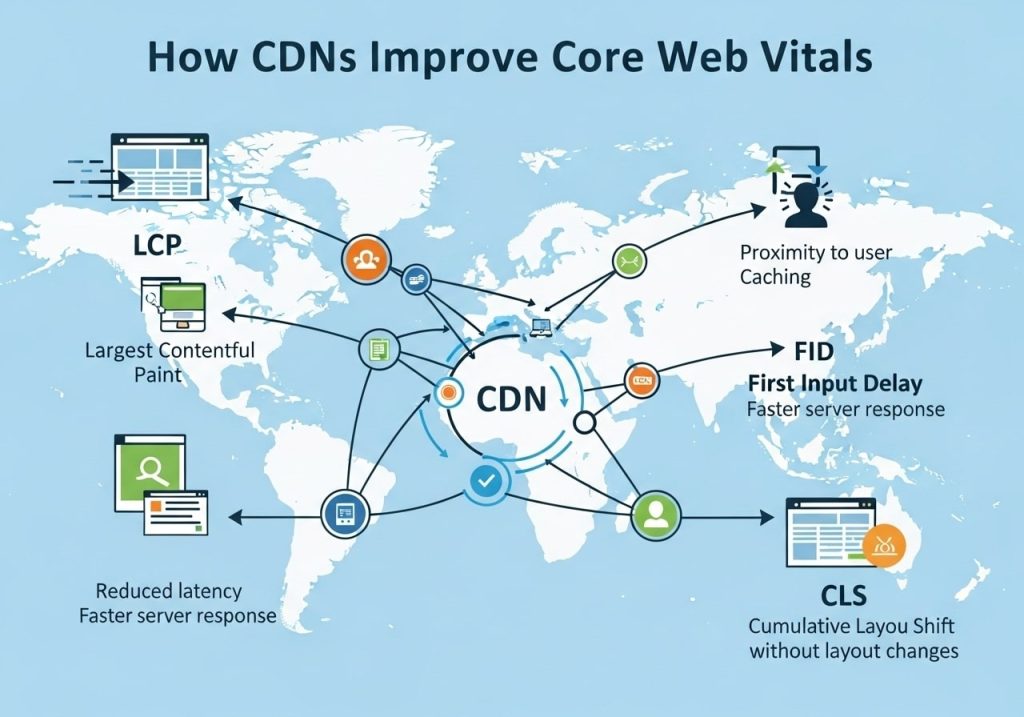
How do CDNs improve Core Web Vitals? Content Delivery Networks help by:
- Reducing server response times
- Caching static resources closer to users
- Optimizing image delivery
- Compressing files automatically
- Load balancing across multiple servers
Limitations and Considerations
What are the limitations of Core Web Vitals?
- May not reflect all user experience aspects
- It can vary significantly between pages
- Real user data may differ from lab data
- Mobile and desktop scores often differ
- Seasonal traffic patterns can affect scores
Is Core Web Vitals Assessment Important?
Is Core Web Vitals assessment important? Absolutely. Google uses these metrics as ranking factors, and they directly impact:
- Search engine rankings
- User experience quality
- Conversion rates
- Bounce rates
- Overall site performance
Advanced Optimization Strategies
Technical Implementation
- Implement critical CSS inlining
- Use resource hints (preload, prefetch, preconnect)
- Optimize server configurations
- Implement proper caching strategies
- Use performance monitoring tools
Ongoing Maintenance
- Regular performance audits
- Continuous monitoring
- Updates and optimizations
- User feedback collection
- Competitive analysis
Next Steps and Implementation
How to improve Core Web Vitals requires a systematic approach:
- Assessment Phase
- Run comprehensive tests
- Identify priority issues
- Set realistic improvement targets
- Implementation Phase
- Start with the highest-impact fixes
- Test changes in the staging environment
- Monitor performance impact
- Monitoring Phase
- Set up ongoing monitoring
- Regular performance reviews
- Adjust strategies based on results
Learning how to fix Core Web Vitals assessment issues takes time and patience. The most important step is starting with a thorough assessment of your current performance and focusing on the changes that will have the biggest impact on your users’ experience.
Remember that Core Web Vitals optimization is an ongoing process, not a one-time fix. Regular monitoring and continuous improvement will help you maintain good scores and provide the best possible experience for your website visitors.
Ready to start improving your Core Web Vitals? Begin by testing your website with Google’s PageSpeed Insights tool and focus on the recommendations that align with your biggest scoring issues. Small improvements in each area will add up to significant overall performance gains.
FAQs
What are Core Web Vitals and why should I care about them?
Core Web Vitals are three specific measurements that Google uses to check how fast and user-friendly your website is. They look at how quickly your page loads, how stable it stays while loading, and how fast people can actually click on things. Google uses these scores to help decide where your website shows up in search results, so better scores can mean more people find your site.
What are the three Core Web Vitals measurements?
The three measurements are: First, how long it takes for the main content to appear on your page (should be under 2.5 seconds). Second, how much your page jumps around while it’s loading (should be very minimal). Third, how quickly buttons and links respond when someone clicks them (should be under 100 milliseconds). These numbers tell Google if people will have a good experience on your website.
How can I check my Core Web Vitals scores?
You can check your scores using free Google tools like PageSpeed Insights or Search Console. Just type in your website address and these tools will give you a report showing exactly how your site performs. They also tell you what specific problems need fixing. The reports show both mobile and desktop scores, which is helpful since most people browse on their phones now.
What’s the biggest reason websites fail Core Web Vitals?
Most websites struggle because their images are too big and slow down the page. Large, unoptimized images can take forever to load and make your whole page feel sluggish. Other common problems include too many plugins, slow web hosting, and code that isn’t written efficiently. The good news is these are all fixable with the right approach.
How do I make my images load faster without losing quality?
Start by resizing your images to the exact size they appear on your website – don’t upload huge images and let the browser shrink them down. Use modern image formats like WebP when possible, and compress your images to reduce file size. You can also set up lazy loading so images only load when people scroll down to see them.
Can my web hosting affect Core Web Vitals scores?
Absolutely. Cheap or overcrowded hosting can make your website load slowly no matter how well you optimize everything else. If your hosting server takes a long time to respond, your Core Web Vitals scores will suffer. Consider upgrading to better hosting with faster servers and good customer support if you’re serious about improving your rankings.
How long does it take to see improvements in Google rankings after fixing Core Web Vitals?
You might start seeing some improvements in a few weeks, but it typically takes 1-3 months to see significant changes in your Google rankings. Google needs time to crawl your site again and recognize the improvements you’ve made. Keep in mind that Core Web Vitals are just one ranking factor, so you’ll need good content and other SEO basics too.
Do I need to hire a developer to fix these issues?
Not always. Many Core Web Vitals problems can be fixed with website plugins, image compression tools, or simple changes to your content management system. However, if you have complex technical issues with your website’s code, a developer can definitely help get things fixed faster and more thoroughly.
Will fixing Core Web Vitals guarantee better Google rankings?
Fixing Core Web Vitals will help your rankings, but it’s not a magic solution. Google looks at hundreds of factors when deciding where to rank websites. You still need good content that helps people, relevant keywords, and other SEO best practices. Think of Core Web Vitals as an important piece of the puzzle, not the whole picture.
How often should I check my Core Web Vitals scores?
Check your scores monthly to make sure everything is running smoothly. If you make major changes to your website, check again within a week or two. Set up Google Search Console to get alerts if your scores drop significantly. Regular monitoring helps you catch problems before they hurt your rankings.