If you’ve been struggling to improve your website’s search rankings, content clusters might be the game-changing SEO content strategy you’ve been missing. This approach has helped countless websites boost their organic traffic by organizing their content in a way that search engines love.
What Are Content Clusters?
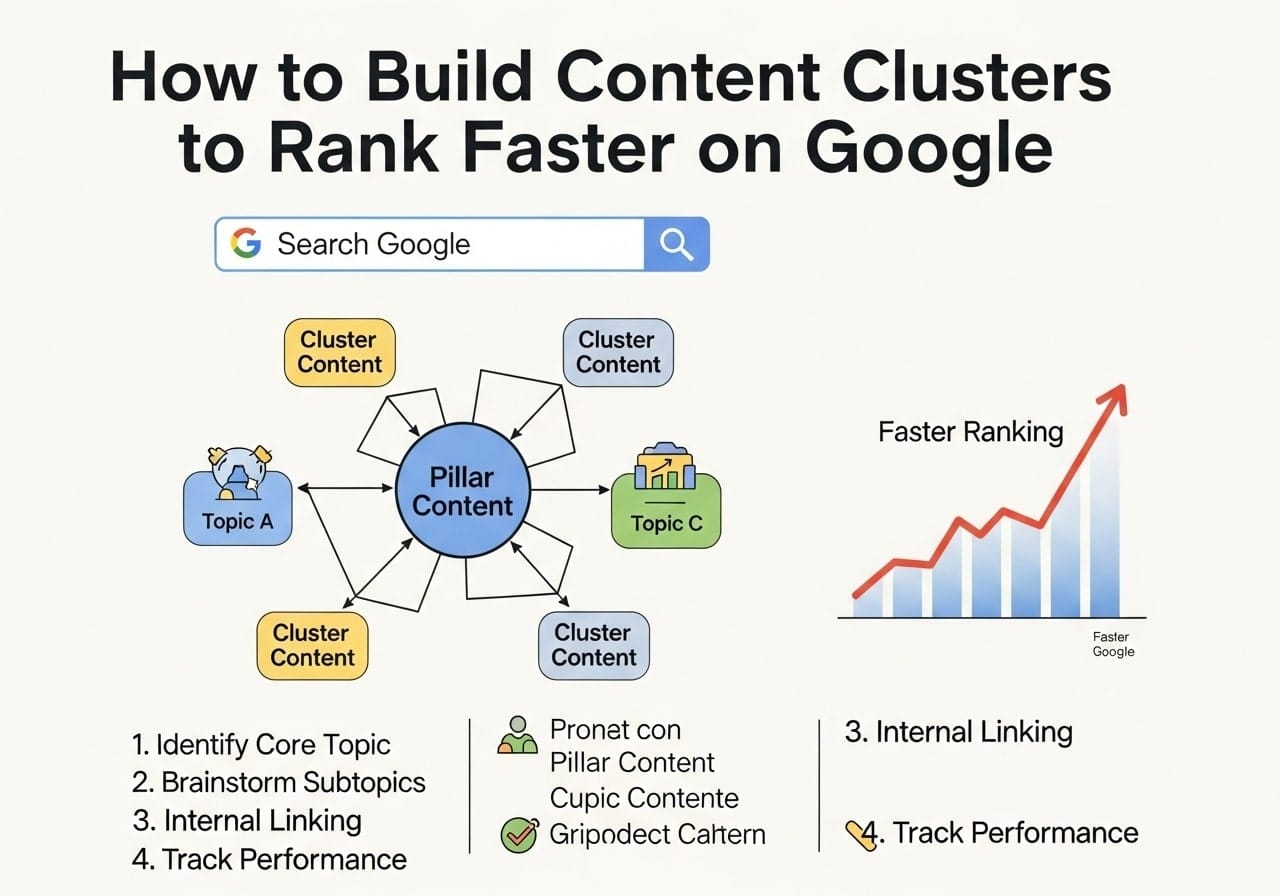
Content clusters are groups of related web pages that focus on a broad topic, connected through internal links and centered around one main “pillar” page. Think of it like a hub-and-spoke model where your pillar page covers a broad topic comprehensively, while cluster pages dive deep into specific subtopics.
A content cluster typically includes:
- One pillar page that covers the main topic broadly
- Multiple cluster pages that explore specific aspects of the topic
- Strategic internal links connecting all pages together
- Clear topic relationships that help search engines understand your content structure
How Content Clusters Work
When you create SEO content clusters, you’re essentially building topic authority. Search engines like Google can better understand what your website is about when you have multiple related pages that link to each other. This structure signals that you’re an expert on the topic, which can improve your rankings across all related keywords.
The Difference Between Content Pillars and Content Clusters
Many people get confused about content pillars vs content clusters, but the distinction is simple:
Content Pillars:
- Broad, comprehensive pages that cover main topics
- Act as the foundation of your content strategy
- Target high-volume, competitive keywords
- Serve as the central hub for related content
Content Clusters:
- Supporting pages that focus on specific subtopics
- Link back to the pillar page
- Target long-tail, specific keywords
- Provide detailed information on narrow aspects of the main topic
For example, if your pillar page is about “Digital Marketing,” your cluster pages might cover “Email Marketing Tips,” “Social Media Advertising,” or “Content Marketing Tools.
Why Content Clusters Matter for SEO
The primary goal of content clusters in SEO is to establish topical authority and improve your website’s overall search visibility. Here’s why this content clusters strategy works so well:
1. Enhanced Topic Authority
When you have multiple pages covering related topics, search engines recognize you as an authority in that space. This topic cluster content strategy helps improve rankings for all related keywords, not just individual pages.
2. Better Internal Link Structure
Content clusters for SEO create natural opportunities for internal linking. These links help:
- Distribute page authority throughout your site
- Guide users to related content
- Help search engines crawl and index your pages more effectively
3. Improved User Experience
Visitors can easily find related information, leading to:
- Longer time spent on your site
- Lower bounce rates
- Higher engagement metrics
- Increased chances of conversion
4. Competitive Advantage
While many websites still focus on individual keyword targeting, creating content clusters gives you an edge by targeting entire topic areas rather than isolated terms.
How to Create Content Clusters: A Step-by-Step Guide
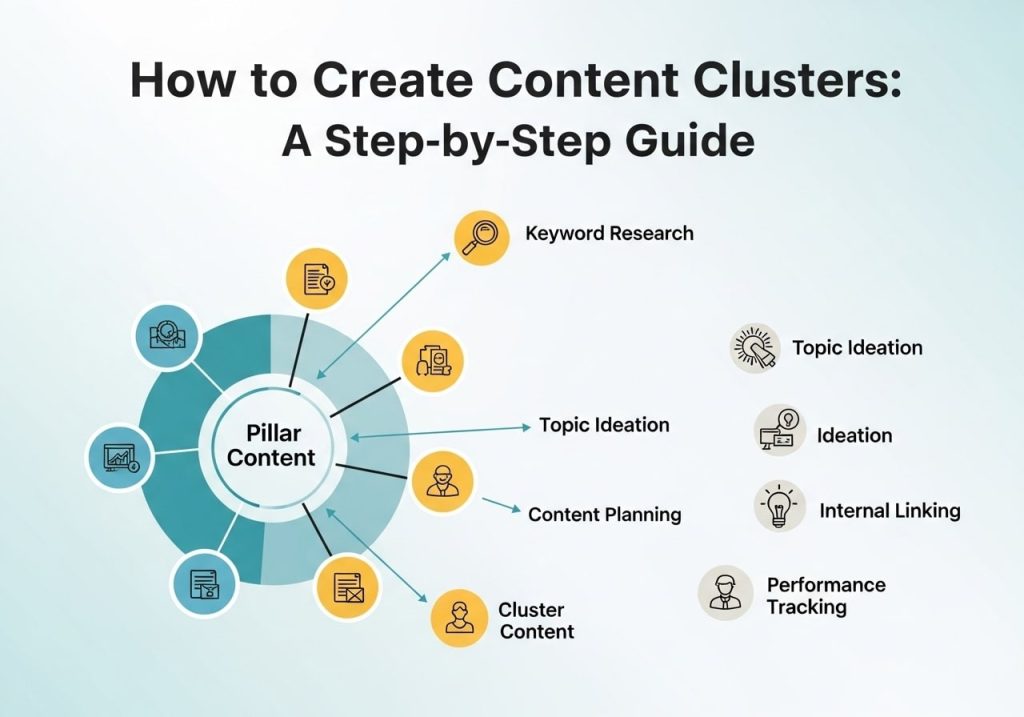
Creating content clusters doesn’t have to be complicated. Follow this proven process:
Step 1: Choose Your Main Topic
Start by selecting a broad topic relevant to your business. This will become your pillar page. Consider:
- Topics your audience cares about
- Subjects where you have expertise
- Areas with good search volume
- Topics that align with your business goals
Step 2: Research Subtopics
Use keyword research tools to find related subtopics. Look for:
- Long-tail keywords related to your main topic
- Questions people ask about the topic
- Common problems or challenges in the area
- Different aspects or approaches to the main topic
Step 3: Create Your Content Map
Plan out your cluster structure:
- Pillar page: Comprehensive guide covering the main topic
- Cluster pages: 5-15 supporting pages covering specific subtopics
- Link strategy: How pages will connect to each other
Step 4: Develop Your Pillar Page
Create a comprehensive resource that:
- Covers the topic broadly but thoroughly
- Links to all relevant cluster pages
- Provides genuine value to readers
- Targets your main keyword naturally
Step 5: Create Cluster Content
Develop supporting pages that:
- Focus on specific subtopics
- Link back to the pillar page
- Connect to related cluster pages when relevant
- Target long-tail keywords
Step 6: Implement Strategic Linking
Connect your content through:
- Contextual internal links
- Related content suggestions
- Navigation elements
- Clear topic hierarchies
Content Cluster Examples That Work
Let’s look at some content cluster examples to see this strategy in action:
Example 1: Fitness Website
Pillar Page: “Complete Guide to Home Workouts
Cluster Pages:
- “Best Home Workout Equipment Under $100”
- “15-Minute HIIT Workouts for Beginners”
- “How to Create a Home Gym in Small Spaces”
- “Nutrition Tips for Home Workout Success”
- “Common Home Workout Mistakes to Avoid”
Example 2: Marketing Blog
Pillar Page: “Email Marketing Strategy Guide”
Cluster Pages:
- “How to Write Subject Lines That Get Opened”
- “Email Marketing Automation Tools Comparison”
- “Building Your Email List from Scratch”
- “Email Design Best Practices”
- “Measuring Email Marketing ROI”
Example 3: Technology Site
Pillar Page: “Cybersecurity for Small Businesses”
Cluster Pages:
- “Password Management Solutions Review”
- “How to Train Employees on Security Awareness”
- “Firewall Setup for Small Business Networks”
- “Data Backup Strategies That Work”
- “Responding to Security Breaches”
Tools for Building Topic Clusters
Several topic clusters tools can help you research, plan, and implement your content strategy:
Free Tools
- Google Keyword Planner: Find related keywords and search volumes
- Answer The Public: Discover questions people ask about your topic
- Google Search Console: Identify content gaps and opportunities
- Google Analytics: Track performance of your cluster content
Paid Tools
- Ahrefs: Comprehensive keyword research and content gap analysis
- SEMrush: Topic cluster generator and content planning features
- Moz: Moz content clusters research and tracking capabilities
- BuzzSumo: Content ideas and topic research
Topic Cluster Templates
Many tools offer topic cluster templates that help you:
- Organize your content planning
- Visualize cluster relationships
- Track content creation progress
- Plan internal linking strategies
What Is a Cluster Page?
A cluster page is a supporting piece of content that focuses on a specific subtopic within your broader content cluster. These pages should:
- Target specific long-tail keywords
- Provide detailed information on narrow topics
- Link back to the main pillar page
- Connect to other relevant cluster pages
- Offer unique value that complements the pillar content
Cluster pages work best when they’re comprehensive enough to stand alone while still supporting the overall topic cluster strategy.
How to Optimize Content for SEO Within Clusters
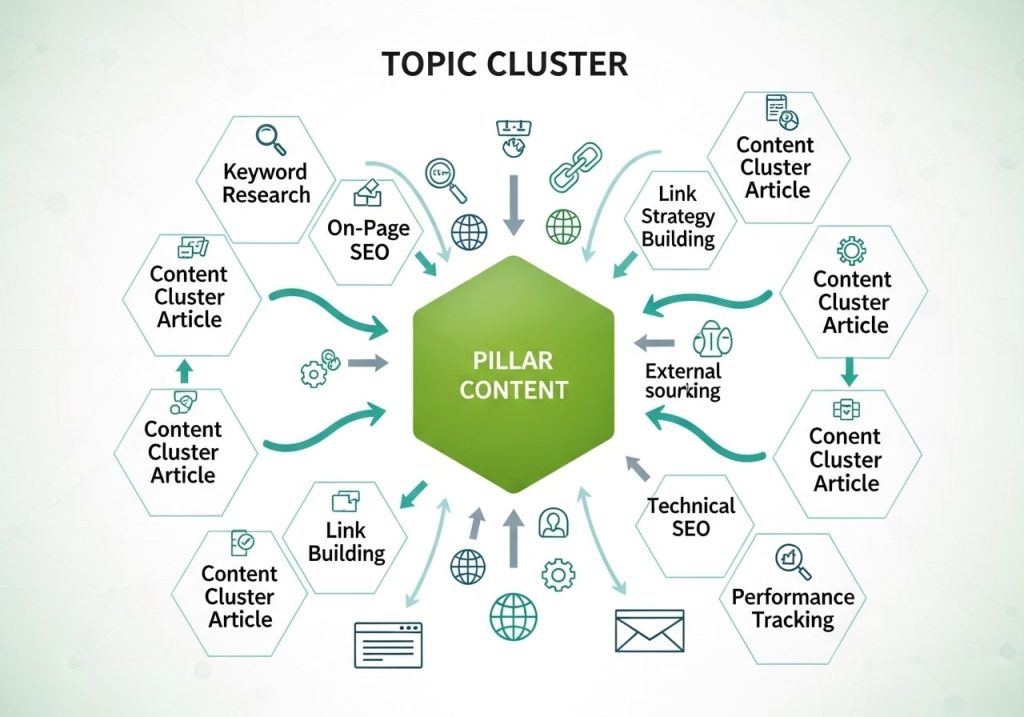
The main tools you use to optimize content for SEO within clusters include:
On-Page Optimization
- Strategic keyword placement
- Optimized title tags and meta descriptions
- Header tag structure (H1, H2, H3)
- Image alt text and optimization
Technical SEO
- Fast page loading speeds
- Mobile-friendly design
- Clean URL structures
- Proper schema markup
Content Quality
- Comprehensive, valuable information
- Clear, readable writing
- Regular updates and maintenance
- User-focused approach
Common Mistakes to Avoid
When implementing content clusters SEO strategies, watch out for these pitfalls:
Over-Optimization
Don’t stuff keywords unnaturally into your content. Focus on creating valuable, readable content that naturally incorporates your target terms.
Weak Internal Linking
Many sites create cluster content but fail to link pages together effectively. Make sure your linking strategy is strategic and helpful for users.
Thin Content
Each page in your cluster should provide substantial value. Avoid creating short, superficial pages just to fill out your cluster.
Ignoring User Intent
Make sure each page matches what users are actually looking for when they search for your target keywords.
Neglecting Updates
Content clusters require ongoing maintenance. Regularly update your content to keep it current and valuable.
Measuring Your Content Cluster Success
Track these key metrics to evaluate your topic cluster content strategy:
Organic Traffic Growth
Monitor increases in organic search traffic to both pillar and cluster pages.
Keyword Rankings
Track improvements in rankings for your target keywords across the entire cluster.
Internal Link Performance
Use tools like Google Analytics to see how users navigate between your cluster pages.
Engagement Metrics
Monitor time on page, bounce rate, and pages per session to gauge content quality.
Conversion Rates
Track how well your cluster content drives desired actions, whether that’s email signups, purchases, or other goals.
Advanced Content Cluster Strategies
Once you’ve mastered basic content clusters, consider these advanced approaches:
Multi-Pillar Clusters
Create interconnected clusters where pillars link to each other, building even stronger topical authority.
Seasonal Content Integration
Develop cluster content that addresses seasonal trends and interests in your industry.
User Journey Mapping
Align your clusters with different stages of the customer journey, from awareness to purchase.
Competitive Cluster Analysis
Study successful topic cluster examples from competitors and identify opportunities they’ve missed.
Content clusters represent one of the most effective SEO strategies available today. By organizing your content around topics rather than individual keywords, you can build authority, improve user experience, and achieve better search rankings.
The key to success lies in thorough planning, quality content creation, and strategic internal linking. Start with one cluster, measure your results, and expand your strategy based on what works best for your audience and industry.
Remember, SEO content clusters are a long-term strategy. While you might see some quick wins, the real benefits come from consistently building and maintaining high-quality, interconnected content over time.
Ready to transform your content strategy? Start by identifying your first pillar topic and begin mapping out the cluster pages that will support it. Your future search rankings will thank you.
FAQs
What areI’ content clusters and why do they matter ford be happy to help you create a comprehensive SEO?
Content clusters are FAQ section! groups of related web pages that all However, I notice that the ” connect to a mainGiven Topic” and “Context” fields topic page on your website. Think in your parameters are empty. of it
To create the like a hub with most relevant and useful FAQs for spokes – your your needs, could you please provide:
** main page coversThe specific topic** you’d like the a broad topic, and the FAQs to cover supporting pages dive (e.g., “online banking,” “yoga deeper into specific parts of that topic. They matter because Google classes,” “pet insurance loves websites,” etc.)
The context where that show expertise on these FAQs will be used (e.g., “company website,” “mobile subjects, and clusters app,” “product manual,” “customer service portal help you demonstrate that you really,” etc.)
Once you share these details, I’ll create 10 know your stuff.
targeted FAQ How do content clusters help my website pairs that directly address what rank faster on Google?
Content clusters work your audience is most likely by creating a strong to ask about. network of related content that Google can The questions and answers will easily understand. When you be clear, practical link related pages, and perfectly matched to your specific situation together, you’re telling Google that.
Just reply with the topic and context, and I your site has’ll get started on your depth and authority on that topic. This often FAQs right away! leads to faster rankings because Google sees you as a reliable source of information, not just someone with random blog posts.
What’s the difference between a pillar page and cluster content?
A pillar page is your main content piece that covers a broad topic in detail – think of it as your comprehensive guide. Cluster content consists of shorter, more focused pieces that explore specific aspects of your main topic. For example, if your pillar page is about “Digital Marketing,” your cluster content might cover social media marketing, email marketing, and content marketing separately.
How do I choose the right topics for my content clusters?
Start by looking at what your audience actually searches for and what problems they need solved. Use tools like Google’s search suggestions, answer sites like Quora, or simply pay attention to questions people ask you. Pick topics that are relevant to your business and that you can write about with genuine knowledge and experience.
How many pieces of content should be in each cluster?
There’s no magic number, but most successful clusters have one pillar page and anywhere from 5-15 supporting pieces. The key is quality over quantity – it’s better to have 7 really good, helpful pieces than 20 thin ones. Focus on covering the topic thoroughly rather than hitting a specific number.
Should I create all cluster content at once or spread it out over time?
You can do either, but spreading it out often works better. Start with your pillar page, then add cluster content over several weeks or months. This approach lets you see what resonates with your audience and adjust your content plan accordingly. Plus, regularly publishing new content keeps your site fresh in Google’s eyes.
How do I properly link between pages in my content cluster?
Use natural, helpful links that make sense to your readers. Link from your pillar page to relevant cluster pieces, and link from cluster content back to your pillar page and to other related cluster pieces when it adds value. Don’t force links – only link when it genuinely helps someone understand the topic better.
Can I build content clusters for a new website, or do I need an established site?
You can absolutely start building content clusters on a new website. In fact, it’s often easier to plan your content structure from the beginning rather than trying to reorganize later. Just remember that new sites take longer to gain trust with Google, so be patient and focus on creating genuinely helpful content.
How long does it take to see ranking improvements from content clusters?
Most people start seeing improvements within 3-6 months, but this varies based on your competition, how established your website is, and how well you execute the strategy. Some newer sites might need 6-12 months to see significant changes, while established sites with good authority might see improvements faster.
What are the biggest mistakes people make when building content clusters?
The biggest mistakes include creating thin, unhelpful content just to fill out the cluster, not linking pages together properly, and choosing topics that are too broad or too narrow for their audience. Another common mistake is abandoning the strategy too early – content clusters are a long-term approach that requires patience and consistency to work well.