When you search for “pizza delivery” on Google, you don’t want results from three states away – you want local options that can actually deliver to your door. That’s geo-targeting for SEO in action, and it’s one of the most powerful ways to connect businesses with customers in their area. Best geo-targeting practices for SEO can transform your online visibility and drive more qualified traffic to your website.
What is Geo-targeting for SEO?
Geo-targeting for SEO is the practice of optimizing your website and online content to appear in search results for specific geographic locations. When someone searches for products or services in a particular area, geo-targeting helps ensure your business shows up when you serve that location.
This strategy goes beyond simply mentioning your city name on your website. It involves creating location-specific content, optimizing for local search terms, and using various tools and techniques to signal to search engines exactly where your business operates.
Key Components of Geo-targeting SEO
- Location-based keywords: Terms that include city names, neighborhoods, or regional identifiers
- Local business listings: Google My Business profiles and directory submissions
- Geographic content: Pages dedicated to specific service areas
- Schema markup: Structured data that helps search engines understand your location
- Local backlinks: Links from other businesses and websites in your area
Why Geo-targeting Marketing Matters for Your Business
Is geo-targeting effective? Absolutely. Studies show that 46% of all Google searches have local intent, meaning people are actively looking for businesses near them. Here’s why geo-targeting marketing should be part of your strategy:
Increased Relevance
When your content matches what people in specific areas are searching for, you’re more likely to appear in their search results. This relevance leads to higher click-through rates and better engagement.
Better Conversion Rates
Local searchers are often ready to buy. Someone searching for “dentist near me” is likely looking to book an appointment soon, not just browsing for information.
Reduced Competition
Instead of competing with every business in your industry globally, geo-targeting lets you focus on your local market where you have a real chance to rank well.
Cost-Effective Marketing
Geo-targeting ads and organic strategies typically cost less than broad, national campaigns while delivering better results for local businesses.
Best Geo-targeting Practices for SEO
Implementing effective seo geo-targeting requires following proven strategies. Here are the 4 SEO best practices that form the foundation of successful geo-targeting:
1. Optimize Your Google My Business Profile
Your Google My Business (GMB) profile is crucial for google geo-targeting. A complete, optimized profile can significantly improve your local search visibility.
Essential GMB optimization steps:
- Claim and verify your business listing
- Fill out every section completely
- Add high-quality photos of your business, products, and services
- Collect and respond to customer reviews
- Post regular updates and offers
- Use relevant categories that match your business
2. Create Location-Specific Content
Geo-targeting website content should speak directly to people in specific areas. This means creating pages for each location you serve.
Effective location page elements:
- Unique, detailed descriptions of your services in each area
- Local landmarks and neighborhood references
- Area-specific testimonials and case studies
- Local contact information and directions
- Community involvement and local partnerships
3. Use Local Keywords Naturally
SEO best practices Google recommends include using keywords that feel natural and helpful to readers. Don’t stuff location names into every sentence – instead, use them where they make sense.
Examples of natural keyword usage:
- “Our Denver accounting firm has served Colorado businesses for over 20 years”
- “Looking for the best pizza in downtown Austin? We deliver throughout the city”
- “Miami residents trust us for reliable air conditioning repair”
4. Build Local Citations and Backlinks
Citations are mentions of your business name, address, and phone number on other websites. Consistent citations across the web help search engines verify your location and improve your local rankings.
Key citation sources:
- Industry-specific directories
- Local chamber of commerce websites
- Community organization sites
- Local news websites
- Social media platforms
Geo-targeting Examples That Drive Results
Let’s look at geo-targeting examples from different industries to see how businesses successfully implement these strategies:
Example 1: Multi-Location Restaurant Chain
A pizza chain with locations in five cities created separate landing pages for each location. Each page included:
- Location-specific menus featuring local favorites
- Store hours and contact information
- Driving directions and parking information
- Local delivery areas with interactive maps
- Customer reviews specific to that location
Results: 150% increase in local organic traffic and 40% more online orders.
Example 2: Home Service Company
A plumbing company serving three counties developed a comprehensive geo-targeting strategy:
- Created service area pages for each major city
- Published blog posts about local plumbing codes and regulations
- Partnered with local hardware stores for backlinks
- Optimized for emergency plumbing searches in each area
Results: First-page rankings for 80% of target local keywords within six months.
Example 3: E-commerce with Local Focus
An outdoor gear retailer wanted to attract customers planning trips to specific national parks:
- Created destination guides for popular hiking areas
- Included gear recommendations for different climates and terrains
- Featured customer photos and stories from each location
- Partnered with local outdoor clubs and guides
Results: 200% increase in organic traffic from geo-targeted content.
SEO Geo-targeting Strategies for Different Platforms
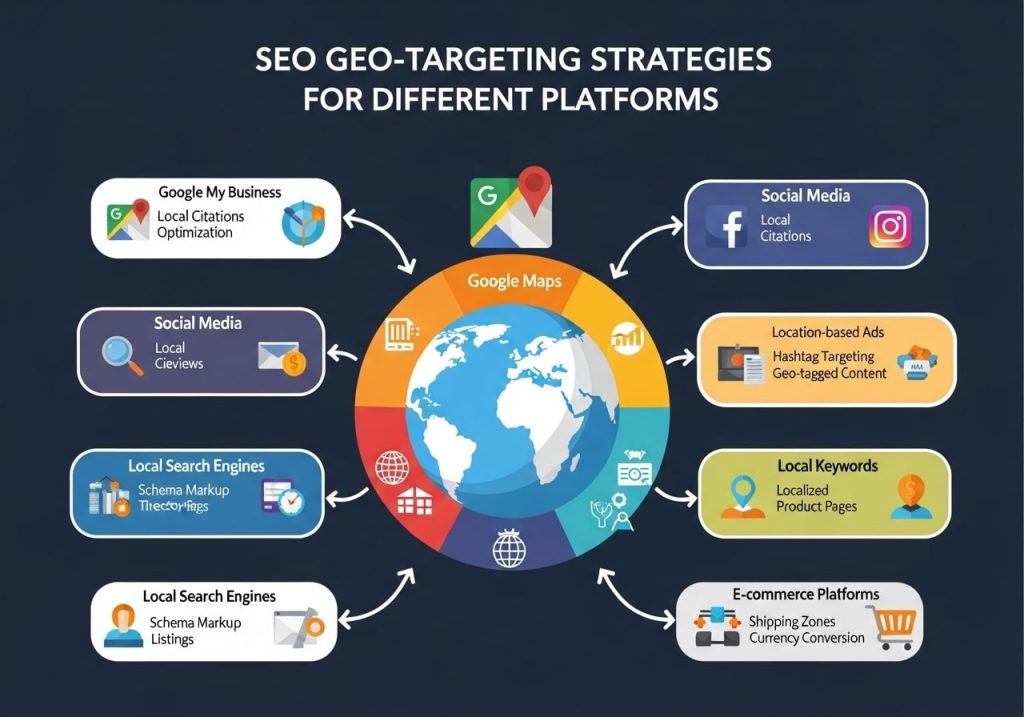
Which SEO strategy targets a specific geographic area? The answer depends on which platform you’re using. Different channels require different approaches to geo-targeting.
Organic Search Geo-targeting
For organic search results, focus on:
- Location-based keyword research: Find terms people in your area actually search for
- Local schema markup: Help search engines understand your business location
- Mobile optimization: Most local searches happen on mobile devices
- Page loading speed: Critical for mobile users searching on the go
Google Ads Geo-targeting
Geo-targeting Google Ads offers precise location controls:
- Set radius targeting around your business locations
- Exclude areas you don’t serve to avoid wasted clicks
- Adjust bids based on location performance
- Use location extensions to show your address
- Create location-specific ad copy and landing pages
Social Media Geo-targeting
Facebook geo-targeting ads and other social platforms provide powerful location options:
- Target by city, state, or country
- Create custom location audiences
- Use behavioral targeting for people traveling to your area
- Post location-specific content organically
- Engage with local community groups and pages
Google Geo-targeting: Essential Techniques
Google geo-targeting involves multiple signals that help the search engine understand where your business operates and should appear in results.
Search Console Geographic Settings
Use Google Search Console to:
- Set your target country for international businesses
- Monitor performance by location
- Identify which geographic queries drive traffic
- Track local ranking improvements
Structured Data for Local Businesses
Implement LocalBusiness schema markup to provide Google with clear location information:
<script type=”application/ld+json”>
{
“@context”: “https://schema.org”,
“@type”: “LocalBusiness”,
“name”: “Your Business Name”,
“address”: {
“@type”: “PostalAddress”,
“streetAddress”: “123 Main Street”,
“addressLocality”: “City”,
“addressRegion”: “State”,
“postalCode”: “12345”
},
“telephone”: “+1-555-123-4567”,
“url”: “https://yourbusiness.com”
}
</script>
Local Link Building Strategies
Building local backlinks strengthens your geo-targeting efforts:
- Local partnerships: Collaborate with complementary businesses
- Community involvement: Sponsor local events or sports teams
- Local media: Pitch stories to area newspapers and blogs
- Chamber membership: Join local business organizations
- Charity work: Support local causes and nonprofits
Facebook Geo-targeting for Better Reach
Extends beyond paid ads to organic content strategies.
Facebook Geo-targeting Ads Best Practices
- Precise location targeting: Use radius targeting around your business locations
- Demographic layering: Combine location with age, interests, and behaviors
- Local event promotion: Target people interested in local events and activities
- Lookalike audiences: Create audiences similar to your local customers
- Dynamic location ads: Show different content based on user location
Geo-targeting Organic Facebook Posts
Geo-targeting organic Facebook posts helps you reach local audiences without paid promotion:
- Post about local events and community news
- Share customer stories from specific locations
- Use local hashtags and location tags
- Engage with other local business pages
- Join and participate in local Facebook groups
TikTok Geo-targeting Opportunities
Geo targeting TikTok content can help businesses reach younger, local audiences:
- Use location-based hashtags
- Participate in local trends and challenges
- Partner with local influencers
- Create content about local landmarks and events
- Target ads to specific geographic areas
Geo-targeting vs Geofencing: Understanding the Difference
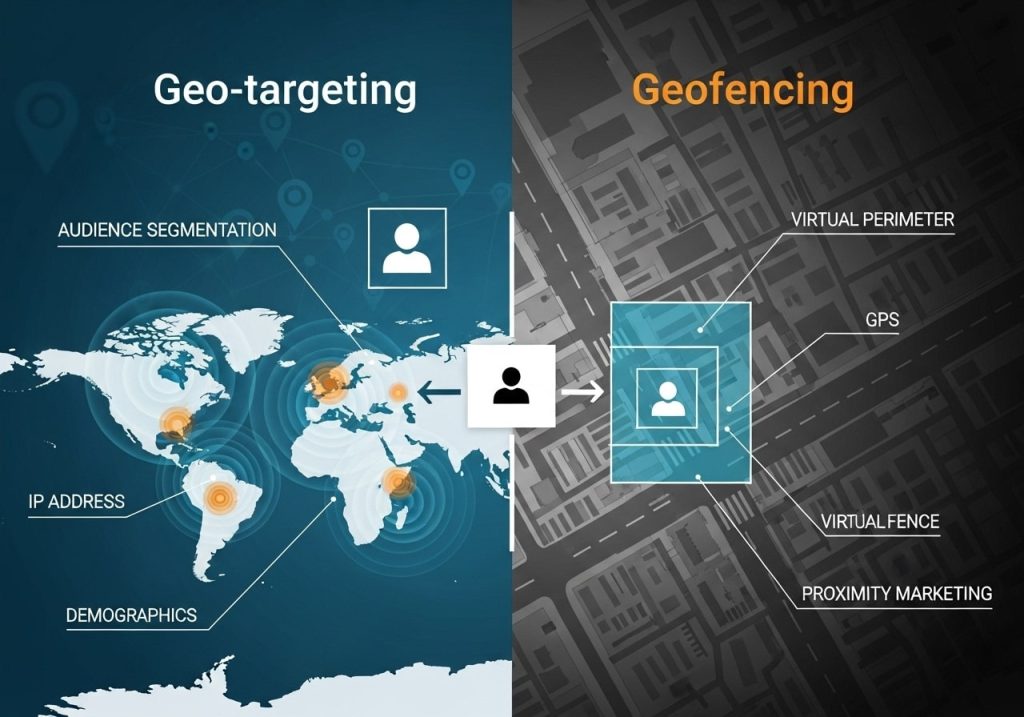
Many businesses confuse geo-targeting vs geofencing, but these are distinct strategies with different applications.
Geo-targeting Characteristics
- Broader location-based targeting
- Works across multiple platforms and channels
- Focuses on where content appears
- Used for both organic and paid strategies
- Targets general geographic areas
Geofencing Characteristics
- Creates virtual boundaries around specific locations
- Triggers actions when users enter or exit areas
- Primarily used for mobile apps and location-based services
- Focuses on real-time user behavior
- Typically more precise than geo-targeting
When to Use Each Strategy
Use geo-targeting when:
- Building long-term local SEO presence
- Creating location-specific content campaigns
- Targeting broad geographic markets
- Optimizing for local search results
Use geofencing when:
- Promoting time-sensitive offers
- Targeting competitor locations
- Creating location-triggered app experiences
- Measuring foot traffic and store visits
Common Geo-targeting Mistakes to Avoid
Even with the best intentions, businesses often make geo-targeting marketing mistakes that hurt their results:
Over-optimization
Stuffing location keywords unnaturally into content makes it hard to read and can trigger search engine penalties. Focus on creating helpful, natural content that happens to include location information.
Duplicate Content Issues
Creating multiple location pages with identical content except for city names provides no value to users or search engines. Each location page should offer unique, valuable information about serving that specific area.
Inconsistent Business Information
Having different versions of your business name, address, or phone number across the web confuses search engines and potential customers. Maintain consistency across all platforms and directories.
Ignoring Mobile Users
Most local searches happen on mobile devices, yet many businesses fail to optimize their geo-targeted content for mobile users. Ensure fast loading times, easy navigation, and click-to-call functionality.
Neglecting Negative Keywords
In geo-targeting ads, failing to exclude irrelevant locations wastes budget and attracts unqualified traffic. Regularly review and update your location targeting settings.
Measuring Geo-targeting Success
Tracking the right metrics helps you understand whether your geo-targeting SEO efforts are working and where you need to improve.
Key Performance Indicators
Local Search Rankings
- Track rankings for location-specific keywords
- Monitor Google My Business insights
- Use tools like BrightLocal or Whitespark for local rank tracking
Website Traffic by Location
- Google Analytics geographic reports
- Organic traffic from local search terms
- Conversion rates by location
- Citation consistency across directories
- Review quantity and quality
- Click-through rates from listings
Geo-targeting Software and Tools
Several tools can help streamline your geo-targeting software needs:
Free Tools:
- Google My Business insights
- Google Analytics geographic data
- Google Search Console location reports
- Facebook Business Manager location data
Paid Tools:
- BrightLocal for local SEO tracking
- Moz Local for citation management
- SEMrush for local keyword research
- Ahrefs for local backlink analysis
Continuous Optimization Strategies
Can you GEO target SEO? Yes, and success requires ongoing optimization:
- Regular keyword research: Local search trends change over time
- Competitor analysis: Monitor what successful local competitors are doing
- Content updates: Keep location pages fresh with current information
- Review management: Actively encourage and respond to customer reviews
- Technical optimization: Ensure your website loads quickly and works well on mobile
Successful geo-targeting for SEO requires patience, consistency, and ongoing refinement. By implementing these best practices and avoiding common mistakes, you can improve your local search visibility and connect with more customers in your area. Start with the basics – claim your Google My Business profile and create location-specific content – then gradually expand your efforts as you see results. Remember, local SEO is a long-term strategy that builds momentum over time, so stay committed to providing value to your local community both online and offline.
FAQs
What exactly is geo-targeting in SEO?
Geo-targeting in SEO is the practice of optimizing your website content and online presence to show up in search results for people in specific locations. When someone searches for services or products in their area, geo-targeting helps your business appear in those local search results. This includes things like adding your city name to your website content, claiming your Google Business Profile, and making sure search engines know where you’re located.
Why should I care about local SEO if I already have a website?
Having a website is great, but if people in your area can’t find it when they search locally, you’re missing out on customers who are ready to buy. Local SEO helps you connect with people who are specifically looking for businesses like yours nearby. These local searchers often have higher purchase intent because they’re actively looking for someone to solve their problem right now.
What’s the difference between regular SEO and geo-targeting?
Regular SEO focuses on ranking for general keywords without considering location, while geo-targeting specifically aims to rank for location-based searches. For example, regular SEO might target “pizza delivery,” but geo-targeting would focus on “pizza delivery Chicago” or “pizza delivery near me.” Geo-targeting is more specific and often faces less competition, making it easier to rank higher.
How do I start with geo-targeting if I’m new to SEO?
Start by claiming and optimizing your Google Business Profile – this is free and one of the most important steps. Then, add your city and region names naturally to your website’s main pages, especially your homepage and contact page. Create content that mentions local landmarks, events, or neighborhoods your customers care about. Make sure your business name, address, and phone number are consistent everywhere online.
What are the most important ranking factors for local search?
Google Business Profile optimization is the biggest factor – make sure it’s complete with photos, hours, and regular updates. Having consistent business information across all online directories matters a lot too. Customer reviews play a huge role, so encourage happy customers to leave reviews. Your website should also be mobile-friendly and load quickly since most local searches happen on phones.
How long does it take to see results from geo-targeting efforts?
Most businesses start seeing some improvements within 2-4 months, but significant results usually take 6-12 months of consistent effort. The timeline depends on how competitive your area is and how much work your online presence needs. Local results can sometimes appear faster than general SEO because there’s less competition, especially in smaller cities or for niche services.
Should I create separate pages for different cities I serve?
Yes, if you genuinely serve multiple cities and can create unique, valuable content for each location. Don’t just copy and paste the same content with different city names – search engines will penalize this. Each location page should have specific information about that area, local testimonials, or services particular to that city. Quality matters more than quantity.
How important are online reviews for local search rankings?
Reviews are extremely important for local SEO. They influence both your search rankings and whether people choose your business over competitors. Focus on getting reviews on Google first, then other platforms where your customers naturally spend time. Respond to all reviews professionally, both positive and negative ones. A steady stream of fresh reviews signals to search engines that you’re an active, legitimate business.
What’s the biggest mistake businesses make with geo-targeting?
The biggest mistake is trying to rank for everywhere instead of focusing on their actual service area. Some businesses stuff their content with dozens of city names hoping to rank for all of them, but this usually backfires. Another common mistake is neglecting their Google Business Profile or having incorrect business information online. Pick your most important locations and do them well rather than spreading yourself too thin.
How do I measure if my geo-targeting efforts are working?
Track your Google Business Profile views and actions (calls, directions, website visits) through Google Business Profile insights. Monitor your rankings for local keywords using free tools like Google Search Console. Watch your website traffic from local searches and phone calls from your local phone number. Most importantly, track actual customers – if more local customers are finding you, your geo-targeting is working.