
How to Install and Customize the Flatsome WordPress Theme
Are you looking for the perfect WordPress theme to build a stunning online store? The Flatsome WordPress theme has become one of the most popular choices for e-commerce websites, and for good reason. In this comprehensive Flatsome WordPress theme tutorial, we’ll explore everything you need to know about this powerful theme and how it can transform your online business.
Flatsome Theme For WordPress
Get the Premium Flatsome Theme

Flatsome Theme Blog Setup: What is the Flatsome WordPress Theme?
What is Flatsome? Flatsome is a premium WordPress theme specifically designed for WooCommerce stores and business websites. Developed by UX Themes, this theme has gained massive popularity among online store owners due to its flexibility, speed, and professional appearance.
The Flatsome theme stands out because it offers a perfect balance between functionality and design. Unlike many other WordPress themes that require extensive coding knowledge, Flatsome provides an intuitive drag-and-drop page builder that makes website creation accessible to everyone.
Since its launch, the WordPress Flatsome theme has been downloaded over 200,000 times and maintains consistently high ratings on ThemeForest. This success comes from its ability to create professional-looking websites without requiring technical expertise.
Why Choose Flatsome for Your WordPress Site?
The best WordPress theme, Flatsome, offers numerous advantages that make it an excellent choice for e-commerce businesses:
Speed and Performance
One of the biggest advantages of the Flatsome WordPress theme is its optimized code structure. The theme loads quickly, which is crucial for both user experience and search engine rankings. Fast-loading websites keep visitors engaged and reduce bounce rates.
Mobile Responsiveness
With more people shopping on mobile devices, having a mobile-friendly website is essential. The Flatsome theme for WordPress automatically adjusts to different screen sizes, ensuring your store looks great on smartphones, tablets, and desktop computers.
WooCommerce Integration
The WordPress Flatsome WooCommerce integration is seamless. The theme includes specialized product page layouts, cart designs, and checkout processes that are optimized for conversions.
Regular Updates
The developers behind Flatsome WordPress regularly release updates that include new features, bug fixes, and security improvements. This ongoing support ensures your website stays current with WordPress updates.
Flatsome WordPress Theme Features
The Flatsome theme comes packed with features that make it stand out from other WordPress themes:
UX Builder
The built-in UX Builder is a powerful drag-and-drop page builder that allows you to create custom layouts without touching code. This visual editor makes it easy to design unique pages that match your brand.
Pre-built Demos
Flatsome WordPress theme includes numerous demo sites that you can import with one click. These demos cover various industries and styles, giving you a head start on your website design.
Header and Footer Builder
Create custom headers and footers with the visual builder. This feature gives you complete control over these important sections of your website.
Advanced Product Layouts
The theme offers multiple product page layouts, including quick view options, image zoom features, and product galleries that showcase your items effectively.
Blog Layouts
The Flatsome theme blog functionality includes several blog layouts and post formats, making it easy to create engaging content that drives traffic to your store.
How to Install Flatsome Theme
Learning how to install the Flatsome theme is straightforward. Here’s a step-by-step guide:
Step 1: Purchase and Download
First, you need to purchase the Flatsome WordPress theme from ThemeForest or an authorized retailer. After purchase, download the theme files to your computer.
Step 2: Access WordPress Admin
Log in to your WordPress admin dashboard and navigate to Appearance > Themes.
Step 3: Upload the Theme
Click “Add New” then “Upload Theme.” Select the Flatsome zip file from your computer and click “Install Now.”
Step 4: Activate the Theme
Once the installation is complete, click “Activate” to make Flatsome your active theme.
Step 5: Install Required Plugins
The Flatsome WordPress theme will prompt you to install recommended plugins, including WooCommerce and other essential tools.
Setting Up Flatsome Child Theme

Creating a Flatsome child theme WordPress setup is crucial for maintaining your customizations when the theme updates. Here’s how to set up a WordPress Flatsome child theme:
Why Use a Child Theme?
A child theme protects your customizations from being lost during theme updates. It inherits all the functionality of the parent theme while allowing you to make changes safely.
Creating the Child Theme
- Create a new folder in your themes directory called “flatsome-child.”
- Create a style.css file with the proper header information
- Create a functions.php file to enqueue the parent theme’s styles
- Activate the child theme from your WordPress admin
The Flatsome WordPress child theme setup ensures that your customizations remain intact even when the main theme receives updates.
Flatsome WordPress Theme Tutorial for Beginners
This Flatsome theme tutorial will help beginners get started with their new website:
Setting Up Your Homepage
After activating the Flatsome theme, start by importing a demo that matches your business type. Go to Flatsome Options > Setup Wizard to begin.
Customizing Colors and Fonts
Navigate to Appearance > Customize to access the theme customizer. Here you can change colors, fonts, and other visual elements to match your brand.
Creating Your First Product
If you’re building an e-commerce store, add your first product through Products > Add New. The WordPress Flatsome tutorial process includes setting up product images, descriptions, and pricing.
Building Custom Pages
Use the UX Builder to create custom pages. This Flatsome WordPress theme tutorial feature allows you to drag and drop elements to build unique layouts.
Setting Up Navigation
Create your main navigation menu through Appearance > Menus. The Flatsome WordPress theme supports multiple menu locations and styles.
How to Update the Flatsome Theme in WordPress
Knowing how to update the Flatsome theme in WordPress is important for security and functionality:
Automatic Updates
The Flatsome WordPress theme supports automatic updates when you register your purchase code. Go to Flatsome Options > Registration and enter your code.
Manual Updates
If automatic updates aren’t working, you can manually update by downloading the latest version from ThemeForest and uploading it through your WordPress admin.
Before Updating
Always create a backup before updating your WordPress Flatsome theme. This precaution ensures you can restore your site if something goes wrong.
Testing After Updates
After updating, check your website to ensure everything works correctly. Test key functions like checkout processes and contact forms.
Flatsome WordPress Theme Documentation Guide
The Flatsome WordPress theme documentation is comprehensive and helpful for users of all skill levels:
Getting Started Guide
The documentation includes a getting-started guide that walks you through the initial setup process.
Feature Explanations
Each feature of the Flatsome theme is explained in detail with screenshots and step-by-step instructions.
Troubleshooting Section
Common issues and their solutions are covered in the troubleshooting section of the Flatsome WordPress theme documentation.
Video Tutorials
In addition to written guides, the documentation includes video tutorials that demonstrate key features visually.
Flatsome Theme Blog Setup
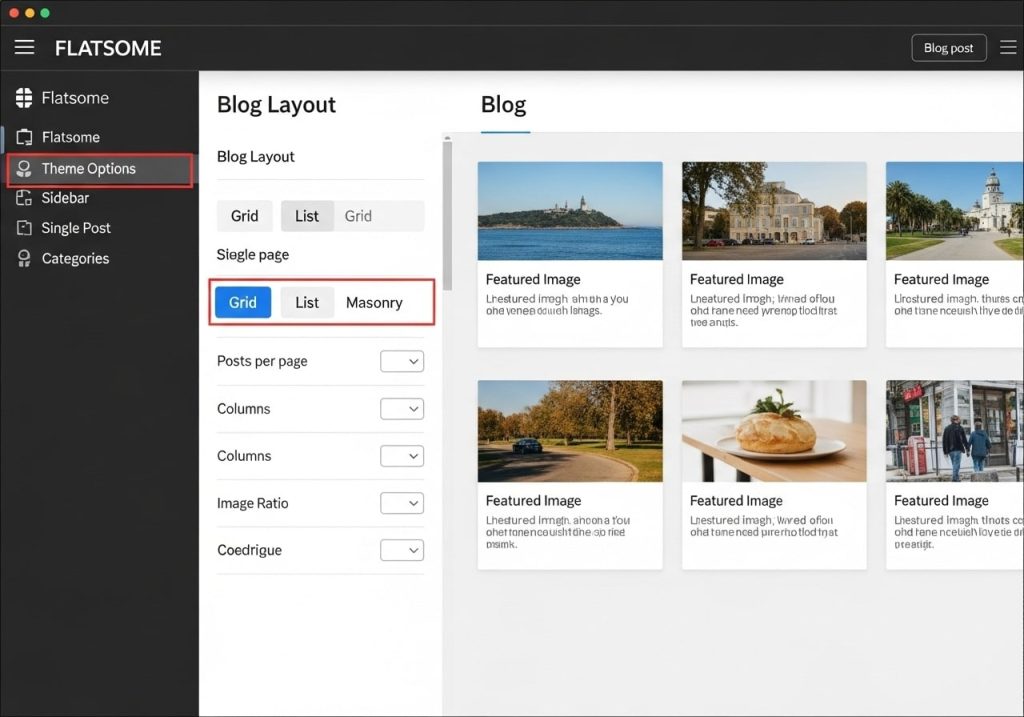
Setting up a Flatsome theme blog helps drive traffic and engage customers:
Choosing Blog Layouts
The Flatsome WordPress theme offers multiple blog layouts, from traditional blog lists to masonry grids and magazine-style layouts.
Creating Engaging Content
Use the theme’s post formats to create varied content types, including video posts, image galleries, and quote posts.
SEO Optimization
The theme is SEO-friendly and works well with popular SEO plugins to help your blog posts rank well in search engines.
Social Media Integration
Connect your blog to social media platforms to increase engagement and reach a wider audience.
Common Issues and Solutions
Even the best themes can have issues. Here are common Flatsome WordPress theme problems and solutions:
Slow Loading Times
If your site loads slowly, optimize images, use caching plugins, and choose a reliable hosting provider.
Plugin Conflicts
Some plugins may not work well with Flatsome WordPress. Test plugins on a staging site before installing them on your live site.
Customization Issues
If customizations aren’t working, check if you’re using a child theme and whether the changes are in the right files.
Update Problems
If updates cause issues, restore from backup and contact support for assistance.
Is Flatsome Theme Worth It? Our Review
This Flatsome theme review examines whether the theme is worth the investment:
Pros
- Excellent WooCommerce integration
- Regular updates and support
- Flexible design options
- Mobile-responsive design
- Good performance optimization
Cons
- Premium pricing
- Learning curve for beginners
- Some features require technical knowledge
Overall Verdict
The Flatsome WordPress theme review shows that while it requires an investment, the theme provides excellent value for serious e-commerce businesses.
Alternatives to Consider
While the Flatsome WordPress theme is excellent, consider these alternatives:
Astra
A lightweight theme that works well with page builders and offers good performance.
OceanWP
A versatile theme with strong WooCommerce support and numerous customization options.
Storefront
WooCommerce’s official theme, which offers deep integration with the plugin.
Divi
A popular theme with a visual page builder and thousands of pre-made layouts.
The Flatsome WordPress theme remains one of the top choices for e-commerce websites due to its combination of features, performance, and support. Whether you’re building your first online store or upgrading an existing site, this WordPress Flatsome theme provides the tools and flexibility needed to create a successful e-commerce website.
By following this comprehensive guide, you’ll be well-equipped to make the most of your Flatsome theme investment and build a website that drives sales and engages customers effectively.