
WPBakery Page Builder Tutorial – Everything You Need to Know About This Popular WordPress Plugin
Building websites with WordPress has never been easier thanks to WPBakery Page Builder, one of the most popular drag-and-drop page builders available today. Whether you’re a beginner looking to create your first website or an experienced developer seeking efficient design tools, this comprehensive WPBakery Page Builder tutorial will walk you through everything you need to know.
WPBakery Page Builder Premium Plugin WordPress
Get the Premium WPBakery Page Builder Plugin
What is WPBakery Page Builder?
WPBakery Page Builder is a powerful WordPress plugin that allows users to create professional-looking websites without any coding knowledge. Previously known as Visual Composer, this drag-and-drop page builder for WordPress has been helping users build stunning websites since 2011.
The plugin works by providing a visual interface where you can drag elements onto your page and arrange them however you like. From simple text blocks to complex image galleries, WPBakery makes it easy to create the exact layout you want for your website.
Key Features of WPBakery Page Builder:
- Frontend and backend editing capabilities
- Responsive design controls
- Extensive library of pre-built elements
- Template system for quick page creation
- Grid builder for complex layouts
- Shortcode support
- WooCommerce compatibility
How to Download and Install WPBakery Page Builder
Getting Your WPBakery Page Builder Download
The WPBakery Page Builder is a premium plugin, which means there’s no official WPBakery Page Builder free download available. However, many WordPress themes include this plugin as a bundled feature, providing significant value to users.
To get the WPBakery Page Builder latest version, you have several options:
- Purchase directly from CodeCanyon – This gives you access to updates and support
- Buy a theme that includes WPBakery – Many premium themes bundle the plugin
- Check with your theme developer – Some provide the plugin separately to their customers
Installation Process
Once you have the WPBakery Page Builder plugin download file, follow these steps:
- Log in to your WordPress admin dashboard
- Navigate to Plugins > Add New
- Click “Upload Plugin”
- Choose your WPBakery zip file
- Click “Install Now”
- Activate the plugin
After activation, you’ll see new editing options when creating or editing pages and posts.
Getting Started: WPBakery Page Builder Tutorial for Beginners
Learning how to use WP Bakery Page Builder might seem overwhelming at first, but it’s actually quite straightforward once you understand the basics.
Understanding the Interface
When you edit a page with WPBakery activated, you’ll notice several new buttons:
- Backend Editor – Edit your page using a drag-and-drop interface in the WordPress admin
- Frontend Editor – Edit your page while viewing it as visitors would see it
- Classic Editor – Return to the standard WordPress editor
Creating Your First Page
Here’s a step-by-step guide for beginners:
- Create a new page in WordPress
- Click “Backend Editor” to start building
- Add a row by clicking the “+” button
- Choose your column structure (1/1, 1/2 + 1/2, 1/3 + 1/3 + 1/3, etc.)
- Add elements by clicking the “+” in each column
- Configure each element using the settings panel
- Preview your page to see how it looks
- Publish when satisfied
Essential WPBakery Page Builder Elements
The WP Bakery Page Builder elements library includes dozens of content blocks:
Text Elements:
- Text Block
- Custom Heading
- Separator with Text
- Message Box
Media Elements:
- Single Image
- Image Gallery
- Video Player
- Image Carousel
Interactive Elements:
- Button
- Call to Action
- Progress Bar
- Tabs and Accordions
Layout Elements:
- Empty Space
- Column Text
- Widgetised Sidebar
- Custom HTML
Using the Frontend and Backend Editor
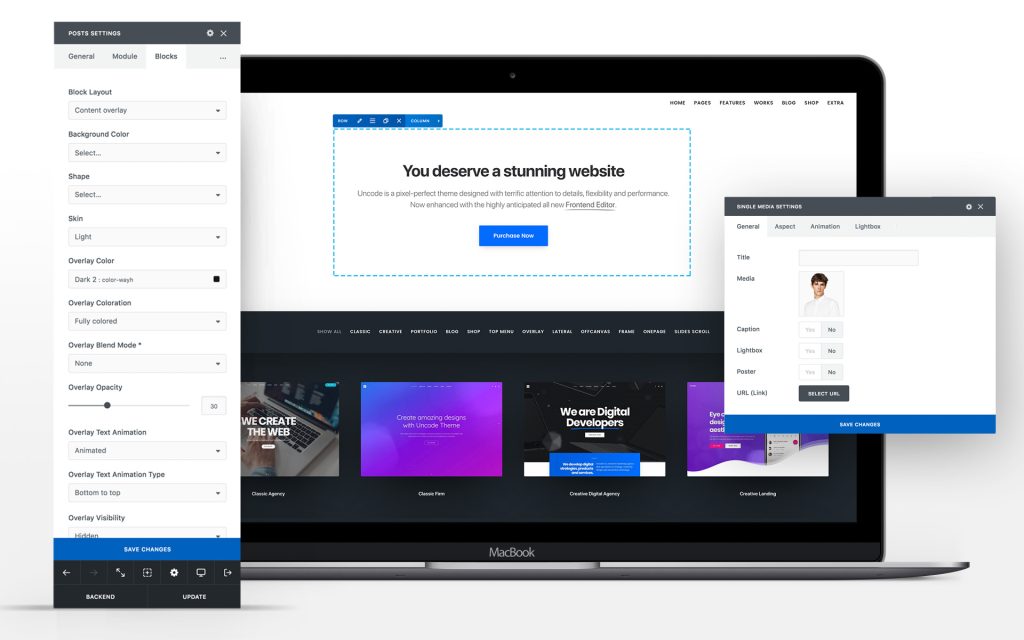
One of WPBakery’s standout features is offering both frontend and backend editing options. Understanding when to use each can significantly improve your workflow.
Backend Editor Benefits
The WPBakery Page Builder backend editor provides:
- Faster performance on complex pages
- Better overview of page structure
- Easier element management
- More stable editing environment
Frontend Editor Advantages
The WP Bakery Page Builder editor frontend mode offers:
- Real-time visual feedback
- Immediate responsive preview
- Contextual editing
- Better understanding of the final appearance
Troubleshooting Editor Issues
Sometimes users experience problems like WPBakery Page Builder backend editor not working or WP Bakery Page Builder not working in the backend. Common solutions include:
- Clearing browser cache
- Checking for plugin conflicts
- Updating to the latest version
- Increasing PHP memory limits
- Contacting the hosting provider about server resources
Essential WPBakery Page Builder Features
Working with Shortcodes
WP Bakery Page Builder shortcode functionality allows you to reuse elements across your site. Every element you create generates a shortcode that can be copied and used elsewhere. This is particularly useful for:
- Consistent call-to-action buttons
- Reusable contact forms
- Standard image galleries
- Common text blocks
Grid Builder Functionality
The WP Bakery Page Builder grid builder helps create complex layouts with precise control over element positioning. This feature is essential for:
- Magazine-style layouts
- Portfolio displays
- Product showcases
- Complex multi-column designs
Creating Sliders and Carousels
The WPBakery Page Builder slider elements help create engaging visual content. You can build:
- Image carousels
- Content sliders
- Testimonial rotators
- Product showcases
Creating Mobile Responsive Designs
WP Bakery Page Builder’s mobile-responsive design is crucial in today’s mobile-first world. The plugin provides several tools for ensuring your site looks great on all devices.
Responsive Settings Options
The WPBakery Page Builder responsive settings include:
- Column width adjustments for different screen sizes
- Element visibility controls
- Mobile-specific spacing options
- Font size adjustments
- Image scaling options
Best Practices for Mobile Design
- Test on actual devices – Don’t rely solely on browser preview
- Optimize images – Use appropriate sizes for mobile viewing
- Consider touch interfaces – Make buttons large enough for fingers
- Simplify navigation – Mobile users prefer streamlined menus
- Prioritize loading speed – Mobile users are often on slower connections
WPBakery Page Builder Addons and Templates
Expanding Functionality with Addons
WPBakery Page Builder addons can significantly extend the plugin’s capabilities. Popular addon categories include:
- Advanced Elements – Additional content blocks and widgets
- Animation Extensions – Enhanced visual effects and transitions
- Integration Addons – Connect with other plugins and services
- Design Packs – Pre-styled element collections
Using Templates Effectively
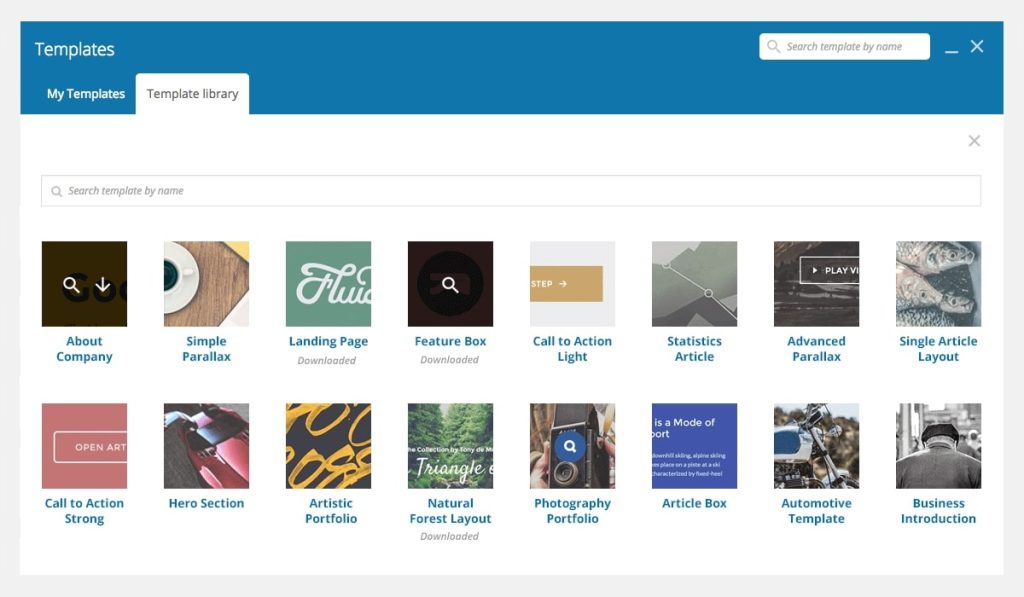
The WP Bakery Page Builder templates and template library provide quick starting points for common page types:
- Landing Pages – Conversion-focused designs
- About Pages – Professional introduction layouts
- Contact Pages – Information and form combinations
- Portfolio Pages – Work showcase designs
- Service Pages – Business offering presentations
WooCommerce Integration
WP Bakery Page Builder WooCommerce compatibility allows you to create custom product pages, shop layouts, and checkout experiences. This integration supports:
- Custom product displays
- Enhanced category pages
- Improved checkout flows
- Marketing-focused product pages
Troubleshooting Common Issues
Update Problems
When experiencing WP Bakery Page Builder update failed errors, try:
- Deactivating the plugin temporarily
- Manually uploading the new version
- Reactivating and checking for conflicts
- Clearing all caches
- Contacting your hosting provider
Performance Optimization
Large pages built with WPBakery can sometimes load slowly. Improve performance by:
- Optimizing images before upload
- Using caching plugins
- Minimizing the number of elements per page
- Choosing fast, reliable hosting
- Regularly updating the plugin
Security Considerations
Like any plugin, WP Bakery Page Builder vulnerability issues can occasionally arise. Protect your site by:
- Keeping the plugin updated
- Using strong WordPress passwords
- Installing security plugins
- Regular site backups
- Monitoring security news
WPBakery vs Other Page Builders
Comparing Popular Options
While WP Bakery Page Builder for WordPress remains popular, it faces competition from newer builders like Elementor and Gutenberg. Here’s how they compare:
WP Bakery Advantages:
- Mature, stable platform
- Extensive theme compatibility
- Both frontend and backend editing
- Large community and addon ecosystem
Potential Drawbacks:
- Interface feels dated compared to newer options
- Can generate bloated HTML code
- Learning curve for beginners
- Premium pricing model
Making the Right Choice
The best WP Bakery Page Builder for WordPress Visual Composer alternative depends on your specific needs:
- Beginners might prefer Elementor’s more modern interface
- Developers might appreciate Gutenberg’s native WordPress integration
- Existing users might benefit from WPBakery’s stability and familiarity
Pricing and Support
Understanding WP Bakery Pricing
WP Bakery Page Builder pricing follows a straightforward model:
- Single-site license
- Extended license for multiple sites
- Regular updates included
- Six months of support included
Getting Help When You Need It
WP Bakery Page Builder support is available through:
- Official documentation and tutorials
- Community forums
- Video tutorials
- WPBakery Page Builder tutorial PDF downloads
- WPBakery Page Builder tutorial in Hindi and other languages
Learning Resources
Improve your skills with:
- WP Bakery Page Builder demo sites
- Step-by-step tutorials
- Community-created content
- YouTube video guides
- Official documentation
Advanced Customization and Development
Custom Element Creation
Developers can extend WPBakery through WP Bakery Page Builder customization by creating custom elements using the shortcode mapper. This allows for:
- Brand-specific design elements
- Integration with custom post types
- Advanced functionality beyond standard elements
- Client-specific requirements
Working with Themes
Many WP Bakery Page Builder themes are specifically designed to work seamlessly with the plugin. When choosing a WP Bakery Page Builder theme, consider:
- Design compatibility with your brand
- Loading speed optimization
- Mobile responsiveness
- Support for the latest WPBakery features
- Regular theme updates
Building professional WordPress websites doesn’t have to be complicated. With WP Bakery Page Builder, you have access to powerful design tools that can help you create exactly the website you envision. Whether you’re building your first site or your hundredth, this drag-and-drop page builder provides the flexibility and features you need to succeed online.
Remember that mastering any tool takes practice, so start with simple projects and gradually work your way up to more complex designs. The investment in learning WPBakery Page Builder will pay dividends in the professional-quality websites you’ll be able to create.
Ready to start building? Download WPBakery Page Builder today and begin creating the website of your dreams. Share your experiences and questions in the comments below – we’d love to hear about your WPBakery Page Builder journey!